Bible presenter · Song presenter · For Windows

Bible verses and worship songs,
beautifully on screen.

ChurchDuo is church presentation software for live services — Tamil and English Bibles, song lyrics, smooth transitions, moving backgrounds and NDI output for OBS. Simple enough for any volunteer.

Windows 10 / 11 · Free download · Subscription from ₹394/month
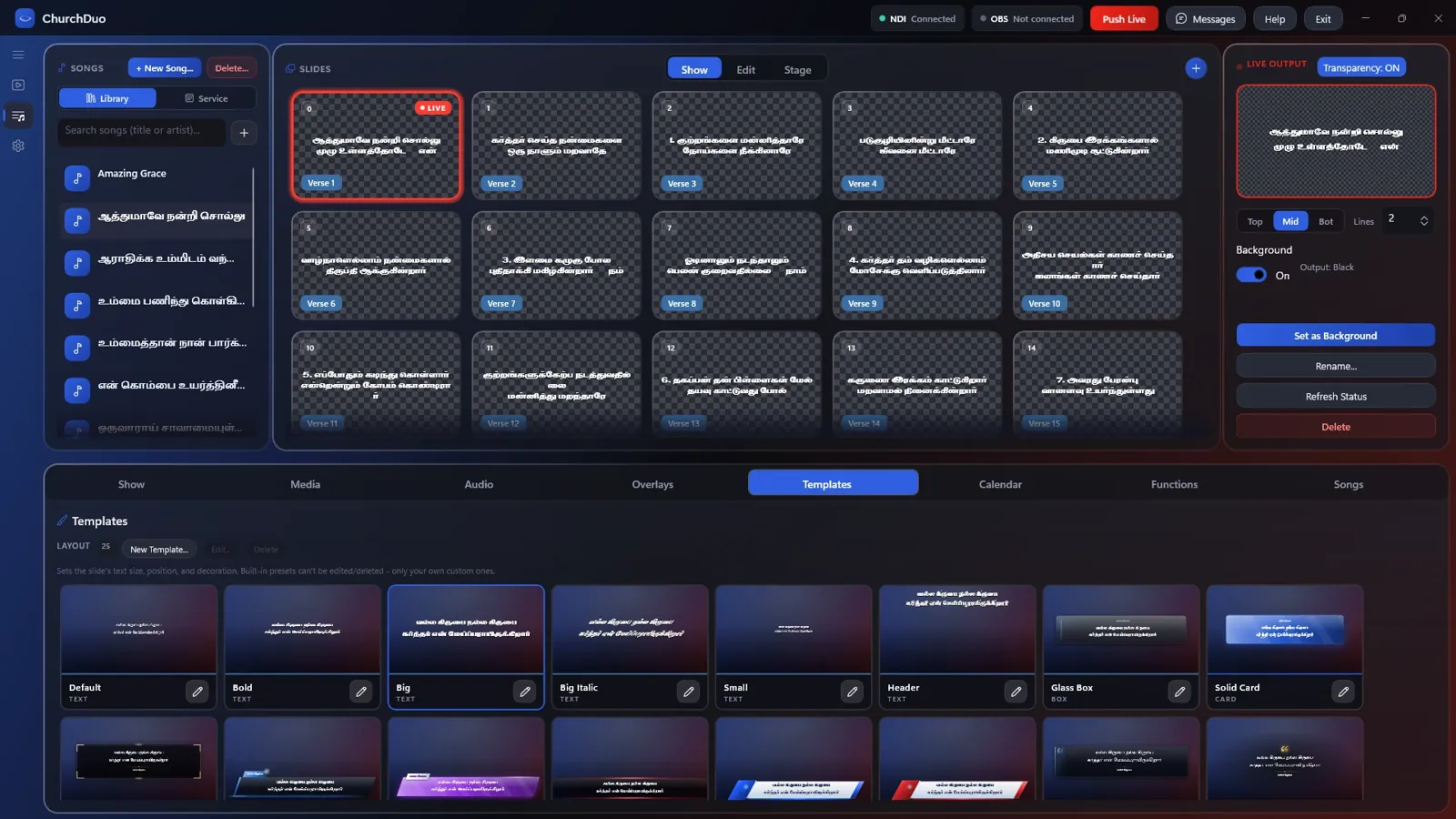
ChurchDuo song presenter with Tamil worship song slides, live output and lower-third templates

Everything a Sunday service needs

From the first worship song to the last Bible reading — one app, one operator, no stress.

📖

Tamil & English Bibles

BSI Tamil and KJV built in, with parallel verses. Find any verse in seconds.

🎵

Song presenter

Song library with Tamil lyric fonts, verse/chorus layouts and service plans.

✨

Smooth transitions

Clean fades between verses, songs and backgrounds. F2 fades everything away.

🎬

Moving backgrounds

Looping video and image backgrounds that never stutter or go blank.

🖥️

Projector & stage display

Full-screen output, a stage view for the worship team, countdowns and announcements.

📱

Phone remote

Change slides from a phone on the same Wi-Fi. No account, no setup.

Built for live streams

ChurchDuo sends a real transparent NDI feed straight into OBS, so lyrics and verses sit cleanly over your camera — no green screen, no capture card.

  • Full HD at 60 frames per second
  • True transparency with soft glows and lower thirds
  • Broadcast-style lower-third templates
  • Shows NDI and OBS connection status at a glance
Psalm 23:1 (KJV)
The LORD is my shepherd; I shall not want.
● LIVE · OBS

Simple pricing

Free to download from the Microsoft Store. One subscription unlocks everything — every feature, every update.

Monthly

₹394
per month
Best value

Yearly

₹3,999
per year
Save over ₹700 compared to monthly

Billed securely through your Microsoft account. Cancel anytime from account.microsoft.com.

Questions

Can't find your answer? Email bethelappsofficial@gmail.com.

Which computers does ChurchDuo run on?

Any Windows 10 or Windows 11 PC or laptop (64-bit). A dedicated graphics card is not required.

Does it work without internet during the service?

Yes. Once installed, ChurchDuo works fully offline — a dropped Wi-Fi connection will never take your screen down mid-service.

How do I use it with OBS?

Install the free NDI Runtime and the OBS NDI plugin, then add the "ChurchDuo (Program Output)" NDI source in OBS. Turn on Transparency in ChurchDuo to put lyrics over your camera.

Can I use Tamil fonts for songs?

Yes. ChurchDuo includes over 100 Tamil lyric fonts and Unicode Tamil support.

How do I cancel my subscription?

Subscriptions are managed by Microsoft. Go to account.microsoft.com → Services & subscriptions and cancel anytime.

Is my data private?

ChurchDuo collects no personal data. Your songs and settings stay on your computer. See the privacy policy.
Ready for Sunday?

Install ChurchDuo from the Microsoft Store and put your first verse on screen in minutes.

Get it from Microsoft Store